 谷姐靓号网
谷姐靓号网参考自:https://www.52pojie.cn/thread-1058012-1-1.html
备份帖
屏蔽黑名单用户的帖子/评论/点评,代码有点丑,没学过JS
如果实在忍不住要键政,可以点击按钮显示垃圾内容
测试用例们稍后将会在本贴回复,进行测试
let blockList = new Array("苏州思杰马克丁", "小学生", "lbw", "chmood", "比特鼻", "表妹", "HOH");
有人可能会问,你这个for循环,垃圾用户一多会不会卡啊,如果确实黑名单用户太多,说明这个论坛已经不适合你了,早点撤退
效果图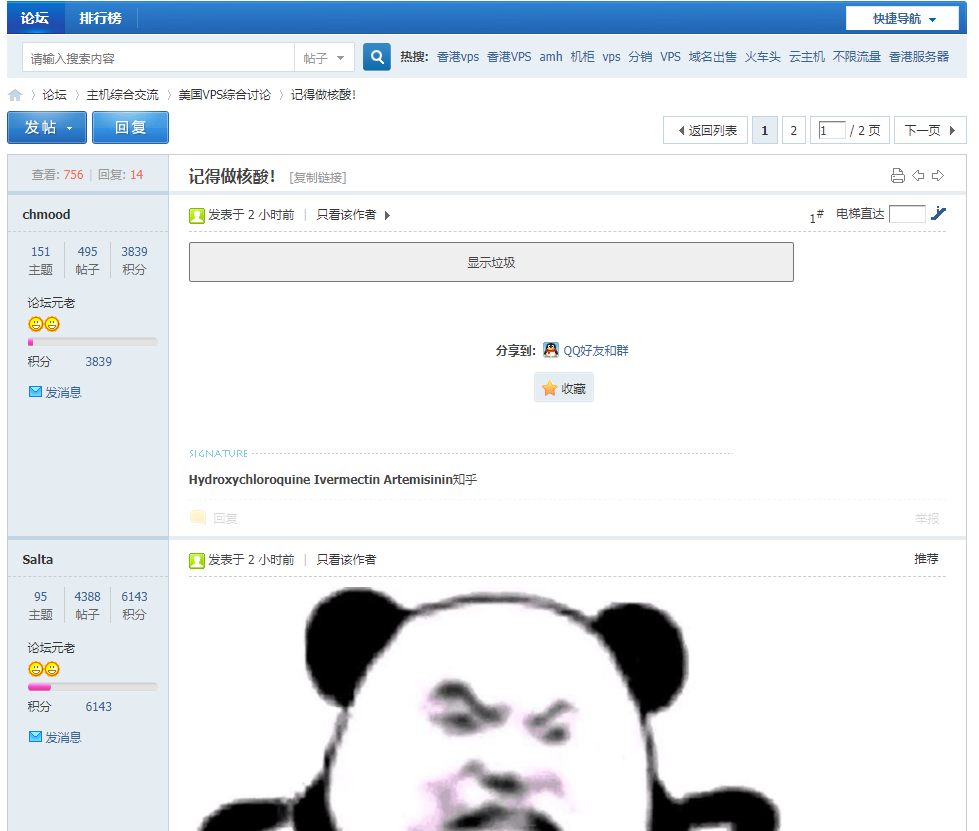
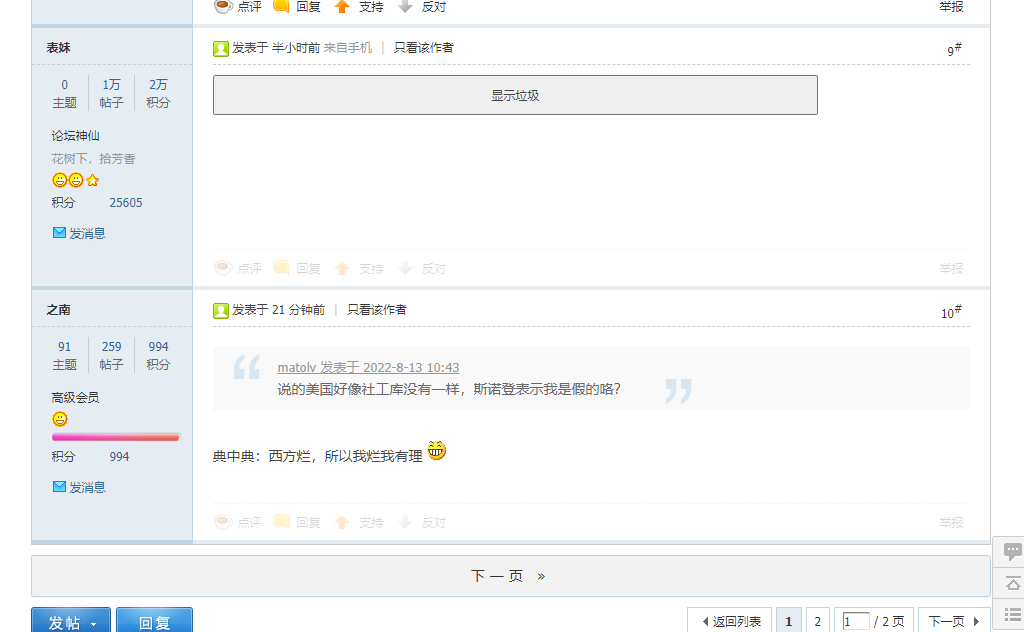
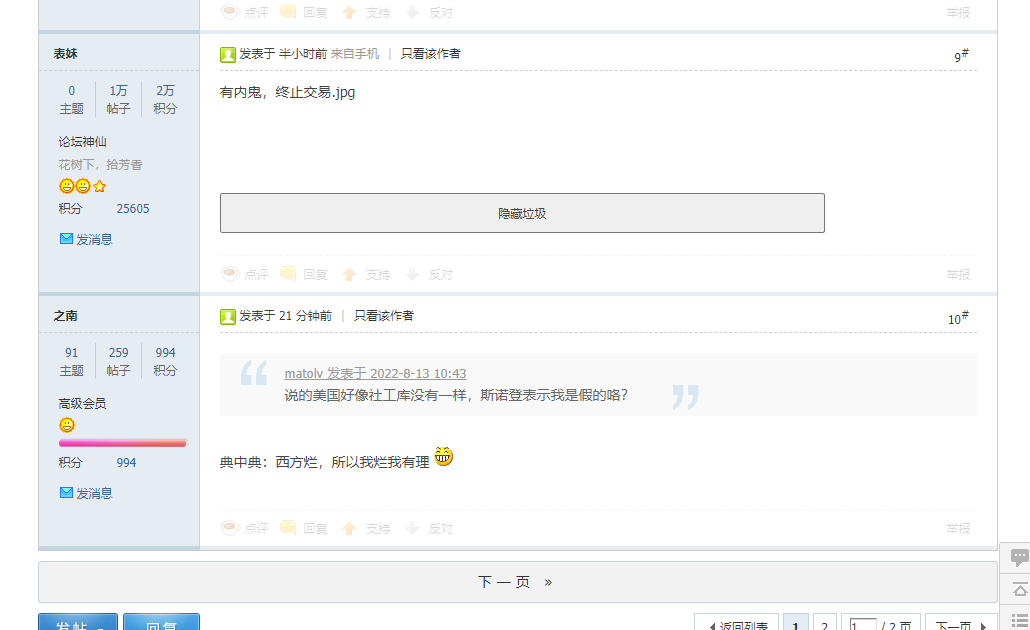
- // ==UserScript==
// [url=home.php?mod=space&uid=5839]@name[/url] LOC垃圾桶
// @namespace Violentmonkey Scripts
// @match https://hostloc.com/*
// @grant none
// @version 1.0
// @author mjj
// @description 2022/8/12 23:34:55
// ==/UserScript==
(function () {
'use strict';
let showContext = "显示垃圾";
let hideContext = "隐藏垃圾";
let BUT_NONE = "none";
let BUT_BLOCK = "block";
let DIV_PREFIX = "bdiv";
let DIV_COMMENT_PREFIX = "bdogCommentDiv";
let x;
// 需要屏蔽的用户名列表
let blockList = new Array("苏州思杰马克丁", "小学生", "lbw", "chmood", "比特鼻", "表妹", "HOH");
// 处理评论
function handleDiv(x) {
let divTemp = document.evaluate('//table/tbody[tr[1]/td[1]//a[text()="' + blockList[x] + '"]]', document, null, XPathResult.UNORDERED_NODE_SNAPSHOT_TYPE, null);
if (!divTemp.snapshotLength) {
return;
}
for (let i = 0, c = ""; i < divTemp.snapshotLength; i++) {
let curDiv = divTemp.snapshotItem(i).firstChild.childNodes[3];
if (curDiv.childNodes[2] == null || curDiv.childNodes[2].tagName !== 'DIV') {
continue;
}
let id = x + i;
curDiv.setAttribute("id", DIV_PREFIX + id);
curDiv.childNodes[2].style.display = BUT_NONE;
let button = createButton(curDiv, id, DIV_PREFIX);
button.style.height = "40px";
button.style.width = "80%";
}
}
// 处理点评
function handleComment(x) {
let commentTemp = document.evaluate('//table/tbody[tr[1]/td[2]/div[2]//a[text()="' + blockList[x] + '"]]', document, null, XPathResult.UNORDERED_NODE_SNAPSHOT_TYPE, null);
if (!commentTemp.snapshotLength) {
return;
}
for (let i = 0, c = ""; i < commentTemp.snapshotLength; i++) {
let curDiv = commentTemp.snapshotItem(i).firstChild.childNodes[3].childNodes[2].childNodes[0].childNodes[3];
if (!curDiv.hasChildNodes()) {
continue;
}
let children = curDiv.childNodes;
for (let j = 0; i < children.length; i++) {
let curComment = children[i];
if (curComment.className !== "pstl xs1 cl" || blockList[x] !== curComment.childNodes[1].childNodes[3].innerText) {
continue;
}
let id = x + i + j;
let curCommentDiv = curComment.childNodes[3];
curCommentDiv.setAttribute("id", DIV_COMMENT_PREFIX + id);
curCommentDiv.style.display = BUT_NONE;
let button = createButton(curComment, id, DIV_COMMENT_PREFIX);
button.style.width = "25%";
}
}
}
// 生成按钮-显示/屏蔽内容
function createButton(curDiv, buttonId, buttonPrefix) {
let button = document.createElement("input");
button.setAttribute("type", "button");
button.setAttribute("id", buttonId);
button.style.textalign = "center";
button.setAttribute("value", showContext);
button.onclick = function () {
let dg = document.getElementById(buttonPrefix + this.id);
if (this.value === hideContext) {
this.value = showContext;
if (buttonPrefix === DIV_PREFIX) {
dg.childNodes[2].style.display = BUT_NONE;
} else {
dg.style.display = BUT_NONE;
}
} else {
this.value = hideContext;
if (buttonPrefix === DIV_PREFIX) {
dg.childNodes[2].style.display = BUT_BLOCK;
} else {
dg.style.display = BUT_BLOCK;
}
}
};
curDiv.appendChild(button);
return button;
}
for (x in blockList) {
handleDiv(x);
handleComment(x);
}
})();
热议
推荐楼 苏州思杰马克丁 3小时前
楼主一个键政双标狗竟然还有脸发这个贴
https://hostloc.com/home.php?mod ... w=me&from=space
回点评:
你这个傻逼早就被加入LOC油猴脚本了
https://greasyfork.org/zh-CN/scripts/448894-hostloc%E8%87%AA%E5%8A%A8%E5%B1%8F%E8%94%BD%E7%B2%89%E8%9B%86%E4%B8%8E%E6%99%BA%E9%9A%9C
推荐楼 zxxx 4小时前
使用方法: 和其他的油猴脚本一样!
第一步:安装一个用户脚本管理器
Chrome 上的 Tampermonkey要使用用户脚本,您首先需要安装一个用户脚本管理器。
根据您使用的浏览器不同,可用的用户脚本管理器也有所不同。
Chrome:Tampermonkey 或 Violent monkey
Firefox:Greasemonkey、Tampermonkey 或 Violentmonkey
Safari:Tampermonkey
Microsoft Edge:Tampermonkey
Opera:Tampermonkey 或 Violentmonkey
Maxthon:Violentmonkey
Dolphin:Tampermonkey
UC:Tampermonkey
Qupzilla:(不需要额外软件)
AdGuard:(不需要额外软件)
第二步:安装一个用户脚本
手动新建脚本添加 添加后注意按需修改
第三步:使用用户脚本
2楼 蝙蝠侠 4小时前
感谢分享,顺便问下有无手机端可用的
4楼 yanzhiling2002 4小时前
前排支持

6楼 jiangyang123 4小时前
这种贴下面我都是鼓励他们尽快润
应润尽润
7楼 浪听涛 4小时前
这种帖子我连打开的兴趣都没有
8楼 2722486 4小时前
支持拉黑鉴证
9楼 Mio 3小时前
用了很久了,黑名单早已150+,已经懒得再加了,加不完的
10楼 醉里耍大刀 3小时前
好多人带节奏,好烦
12楼 94079490 3小时前
好家伙,我直接好家伙
13楼 听风的歌 3小时前
键政狗太多了
14楼 比特鼻 3小时前
对,@表妹 就是如图所示就个垃圾
15楼 苏州思杰马克丁 3小时前
楼主一个键政双标狗竟然还有脸发这个贴
https://hostloc.com/home.php?mod ... w=me&from=space
回点评:
你这个傻逼早就被加入LOC油猴脚本了
https://greasyfork.org/zh-CN/scripts/448894-hostloc%E8%87%AA%E5%8A%A8%E5%B1%8F%E8%94%BD%E7%B2%89%E8%9B%86%E4%B8%8E%E6%99%BA%E9%9A%9C
16楼 Corei7 2小时前
楼主一个键政双标狗竟然还有脸发这个贴
https://hostloc.com/home.php?mod=space&uid=32612&do=thread&t ...
回复你的疑问,
17楼 苏州思杰马克丁 2小时前
回复你的疑问,
傻逼滚远点看见就烦
申明:本文内容由网友收集分享,仅供学习参考使用。如文中内容侵犯到您的利益,请在文章下方留言,本站会第一时间进行处理。




评论前必须登录!
立即登录 注册